The lawn used to water on a fixed timer. That meant it watered on days it was about to rain, and watered the same amount whether it was 65 degrees or 95. Neither of those is actually what a lawn needs. What it needs changes with the weather, so the schedule should too.
I described the behavior I wanted in plain terms, water more when it’s hot, skip a cycle if rain is coming, let me pause the whole thing by hand for a day, and Claude worked out the actual template logic and the Jinja math underneath it.
Why not just use the app
The controllers come with their own app, which is the normal way to do all of this, and it wasn’t good enough. In order of how much each one annoyed me:
- Only time-based schedules: no weather awareness at all, just a schedule you set once and it runs, rain or not.
- Each zone gets its own screen: two controllers, two zones each, so that’s four separate schedules to manage instead of one view where I could actually sequence them the way I wanted.
- Toggling water on or off takes several taps: which matters most exactly when you need it fastest, like when the damn sprinklers kick on mid-mow and you need them off right now.
- The one that actually pushed me to build this: the app won’t let you change a controller’s state more than once every 10 seconds, presumably to stop people from hammering the motor that opens and closes the valve and draining the battery. Reasonable as a battery-protection measure, miserable as a UI constraint when you’re trying to get four zones to behave the way you want.
None of that means the hardware is bad, the valves and the wireless range are fine. It means the software controlling it wasn’t built for someone who wanted to change the rules, not just follow them.
Two yards, and neither is a normal lawn
The grass sits on top of two septic drainfields, front and back, which are engineered to evaporate liquid, not hold onto it. Watering them at all works against what they’re designed to do. We haven’t had any performance issues out of the septic system from it, and we wanted grass, so it’s a tradeoff I’ve made on purpose, not one I’ve ignored.
The front and back also get completely different amounts of sun: the front yard sits in full intensity sunlight most of the day, while the back yard is shaded by very tall trees. That’s why the front needs meaningfully more water than the back, and the automation’s numbers reflect it directly, the front duration is always longer than the back for the same conditions.
Because it’s a drainfield rather than normal deep soil, the lawn needs watering far more often than a typical lawn would, but for much less time per cycle. The usual advice for a healthy lawn is to water deeply and infrequently; this system waters shallowly and often instead, because that’s what the engineering underneath it calls for. The total volume works out to roughly the same as deep-watering a normal lawn every two days. It’s not using more water, just spreading the same amount out differently.
There’s a second reason the volume mattered to me. Our neighborhood shares a well and the same aquifer underneath it, and I didn’t want to be the household everyone quietly assumes is running the sprinklers too much. With the automation actually tracking what gets used and when, I can see exactly how much water goes into the lawn, and keep our household below what a typical family of four uses, instead of just guessing and hoping.
Four zones, two taps
Each tap runs a RAINPOINT smart water timer, a two-outlet wireless valve controller, one on the front tap and one on the back. Home Assistant talks to both of them through the RainPoint cloud integration rather than anything local, the same pattern used for other cloud-connected devices around the house: no wiring back to the hub, just an account Home Assistant can read and control through.
Each yard is split into two zones fed from the same tap, and both zones on one tap can’t run at once, the water pressure would drop too low for either sprinkler head to reach its range. Front and back are on separate taps though, with separate pressure, so they can run at the same time as each other. That’s four zones total, sequenced so nothing ever competes for the same tap:
- Zone 1 runs first, front and back in parallel, since they don’t share a tap.
- Zone 2 follows the same way, once zone 1 closes on both sides.
The script that actually opens and closes the valves:
alias: Water Lawn
description: >
  Waters all zones sequentially within each yard, but front and back run in
  parallel since they are on separate water pressure. Zone 1 runs first
  across both yards, then Zone 2.
mode: restart
fields:
  front_duration:
    selector:
      number:
        min: 1
        max: 30
        unit_of_measurement: minutes
    default: 10
  back_duration:
    selector:
      number:
        min: 1
        max: 30
        unit_of_measurement: minutes
    default: 8
sequence:
  - alias: "Open valves: Zone 1 (front + back)"
    parallel:
      - action: valve.open_valve
        target:
          entity_id: valve.front_yard_zone_1
        alias: "Open valve: front zone 1"
      - action: valve.open_valve
        target:
          entity_id: valve.backyard_zone_1
        alias: "Open valve: back zone 1"
  - delay:
      minutes: "{{ [front_duration, back_duration] | max }}"
  - alias: "Close valves: Zone 1 (front + back)"
    parallel:
      - action: valve.close_valve
        target:
          entity_id: valve.front_yard_zone_1
      - action: valve.close_valve
        target:
          entity_id: valve.backyard_zone_1
  - alias: "Open valves: Zone 2 (front + back)"
    parallel:
      - action: valve.open_valve
        target:
          entity_id: valve.front_yard_zone_2
        alias: "Open valve: front zone 2"
      - action: valve.open_valve
        target:
          entity_id: valve.backyard_zone_2
        alias: "Open valve: back zone 2"
  - delay:
      minutes: "{{ [front_duration, back_duration] | max }}"
  - alias: "Close valves: Zone 2 (front + back)"
    parallel:
      - action: valve.close_valve
        target:
          entity_id: valve.front_yard_zone_2
      - action: valve.close_valve
        target:
          entity_id: valve.backyard_zone_2
It only takes one duration per side, front and back, not four. Front zone 1
and 2 both run for front_duration, back zone 1 and 2 both run for
back_duration, and the daily schedule (below) is the thing deciding what
those two numbers should actually be for the current weather.
What the daily schedule does
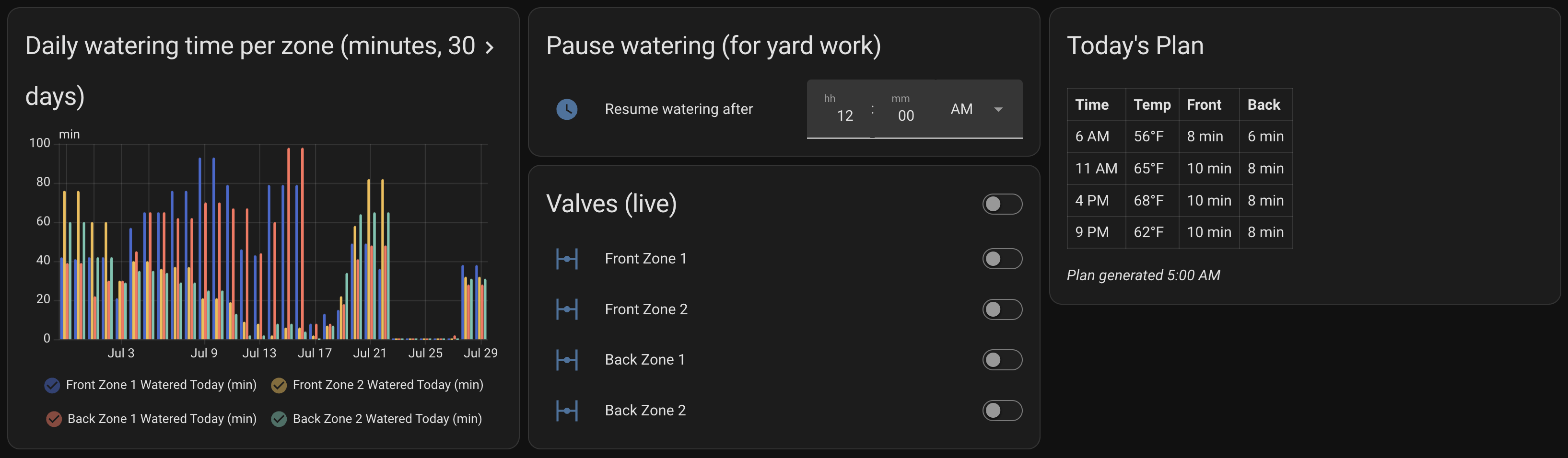
Once a day, at 5am, it pulls the hourly forecast and builds a watering plan from scratch:
- Hotter weather means more frequent cycles, not just longer ones: the gap between waterings shrinks as the forecast temperature climbs, from roughly every 5 to 6 hours when it’s cool out down to under 90 minutes on the hottest days.
- Rain is checked per cycle, not per day: a rainy afternoon doesn’t cancel a dry morning cycle. Each hour in the plan is judged on its own forecast.
- Yard work overrides the schedule: there’s a pause-until time I can set by hand. Any cycle scheduled before that time gets skipped instead of run, and the pause automatically resets to midnight at the end of each day’s run, so forgetting to clear it doesn’t cost me the next day too.
- It tells me what it’s doing: one notification each morning with the full plan for the day, then one at every cycle, either that it’s watering (and for how long, front and back) or that it skipped a cycle because the pause was active.
The automation
This is the daily-planning automation itself, exported straight from Home Assistant:
alias: Lawn watering schedule
description: >
  Runs once at 5am, fetches the day's hourly forecast, and dynamically schedules
  watering cycles based on predicted LOCAL-TIME temperature. Rain is handled
  PER-CYCLE, not per-day. Cycles before input_datetime.lawn_pause_until are
  skipped (for yard work / mowing); the pause is reset to 00:00:00 at the end of
  each run so it never carries into the next day. TUNING VARIABLES at top.
triggers:
  - trigger: time
    at: "05:00:00"
actions:
  - alias: Cancel any running watering script
    action: script.turn_off
    target:
      entity_id: script.water_lawn
    data: {}
  - action: script.stop_watering_lawn_grass
    alias: Close all valves
  - action: weather.get_forecasts
    target:
      entity_id: weather.forecast_home
    data:
      type: hourly
    response_variable: hourly_forecast
  - variables:
      front_cool: 8
      front_warm: 10
      front_hot: 14
      front_very_hot: 18
      front_extreme: 22
      back_cool: 6
      back_warm: 8
      back_hot: 10
      back_very_hot: 13
      back_extreme: 16
      interval_cool: 5.7
      interval_warm: 4.3
      interval_hot: 2.9
      interval_very_hot: 2.9
      interval_extreme: 1.4
      water_start: 6
      water_end: 21
      rain_skip_mm: 0.2
  - variables:
      hourly: "{{ hourly_forecast['weather.forecast_home'].forecast }}"
      plan: >
        {% set ns = namespace(cycles=[], last_watered=-99) %} {% set today =
        now().date() %} {% for slot in hourly %}
          {% set local_dt = slot.datetime | as_datetime | as_local %}
          {% set hour = local_dt.hour %}
          {% if local_dt.date() == today and hour >= water_start and hour <= water_end %}
            {% set temp = slot.temperature | float(70) %}
            {% set condition = slot.condition %}
            {% set precip = slot.precipitation | float(0) %}
            {% if temp > 85 %}
              {% set interval = interval_extreme %}
              {% set fd = front_extreme %}
              {% set bd = back_extreme %}
            {% elif temp > 80 %}
              {% set interval = interval_very_hot %}
              {% set fd = front_very_hot %}
              {% set bd = back_very_hot %}
            {% elif temp > 70 %}
              {% set interval = interval_hot %}
              {% set fd = front_hot %}
              {% set bd = back_hot %}
            {% elif temp > 60 %}
              {% set interval = interval_warm %}
              {% set fd = front_warm %}
              {% set bd = back_warm %}
            {% else %}
              {% set interval = interval_cool %}
              {% set fd = front_cool %}
              {% set bd = back_cool %}
            {% endif %}
            {% set is_wet = condition in ['rainy','pouring','lightning-rainy','snowy','snowy-rainy','hail'] or precip > rain_skip_mm %}
            {% if not is_wet %}
              {% if (hour - ns.last_watered) >= interval %}
                {% set ns.cycles = ns.cycles + [{'ts': as_timestamp(slot.datetime) | int, 'hour': hour, 'temp': temp | int, 'front': fd, 'back': bd}] %}
                {% set ns.last_watered = hour %}
              {% endif %}
            {% endif %}
          {% endif %}
        {% endfor %} {{ ns.cycles }}
  - action: notify.mobile_app_gage_17
    data:
      title: 🌱 Lawn watering plan for today
      message: >
        {% if plan | length == 0 %} No watering scheduled today (rain expected
        all day or outside window). {% else %} {{ plan | length }} cycle(s)
        planned: {% for c in plan %} • {{ c.ts | timestamp_custom('%-I %p') }} —
        {{ c.temp }}°F — front {{ c.front }}m / back {{ c.back }}m {% endfor %}
        {% endif %}
  - event: lawn_plan_updated
    event_data:
      cycles: "{{ plan }}"
  - repeat:
      for_each: "{{ plan }}"
      sequence:
        - delay:
            seconds: "{{ [ (repeat.item.ts - as_timestamp(now())) | int, 0 ] | max }}"
        - if:
            - condition: template
              value_template: |
                {{ has_value('input_datetime.lawn_pause_until')
                   and now() < today_at(states('input_datetime.lawn_pause_until')) }}
          then:
            - action: notify.mobile_app_gage_17
              data:
                title: ⏸️ Watering skipped (paused)
                message: >
                  Skipped the {{ repeat.item.ts | timestamp_custom('%-I %p') }}
                  cycle ({{ repeat.item.temp }}°F, would have been front {{
                  repeat.item.front }}m / back {{ repeat.item.back }}m). Paused
                  until {{ today_at(states('input_datetime.lawn_pause_until')) |
                  as_timestamp | timestamp_custom('%-I:%M %p') }}.
          else:
            - action: notify.mobile_app_gage_17
              data:
                title: 💧 Watering now
                message: >
                  Cycle {{ repeat.index }} of {{ plan | length }} ({{
                  repeat.item.temp }}°F): front {{ repeat.item.front }}
                  min/zone, back {{ repeat.item.back }} min/zone. Total run ~{{
                  ([repeat.item.front, repeat.item.back] | max) * 2 }} min.
            - action: script.water_lawn
              data:
                front_duration: "{{ repeat.item.front | int }}"
                back_duration: "{{ repeat.item.back | int }}"
  - action: input_datetime.set_datetime
    target:
      entity_id: input_datetime.lawn_pause_until
    data:
      time: "00:00:00"
    alias: Reset pause at end of run
mode: restart
Why it’s built this way
- The plan is computed once, up front: rather than deciding hour by hour in real time, the whole day’s plan gets built at 5am and stored as a list. Everything after that just walks through the list, which makes the actual watering logic simple even though the planning logic isn’t. It also means I get the morning notification with the full plan before I’ve even had coffee, so I can plan yard work like mowing around the actual watering times instead of guessing. If a cycle’s about to land at a bad time, I can postpone it by hand from the Home Assistant app instead of working around it.
mode: restart: if this automation somehow got triggered again while a run was in progress, it starts over cleanly instead of running two plans on top of each other. In practice it only ever fires once a day, but it costs nothing to be safe about it.- The pause resets itself: the easy failure mode for a “pause until” field is forgetting to clear it. Resetting it to midnight at the end of every run means a forgotten pause only ever costs you the rest of that one day.
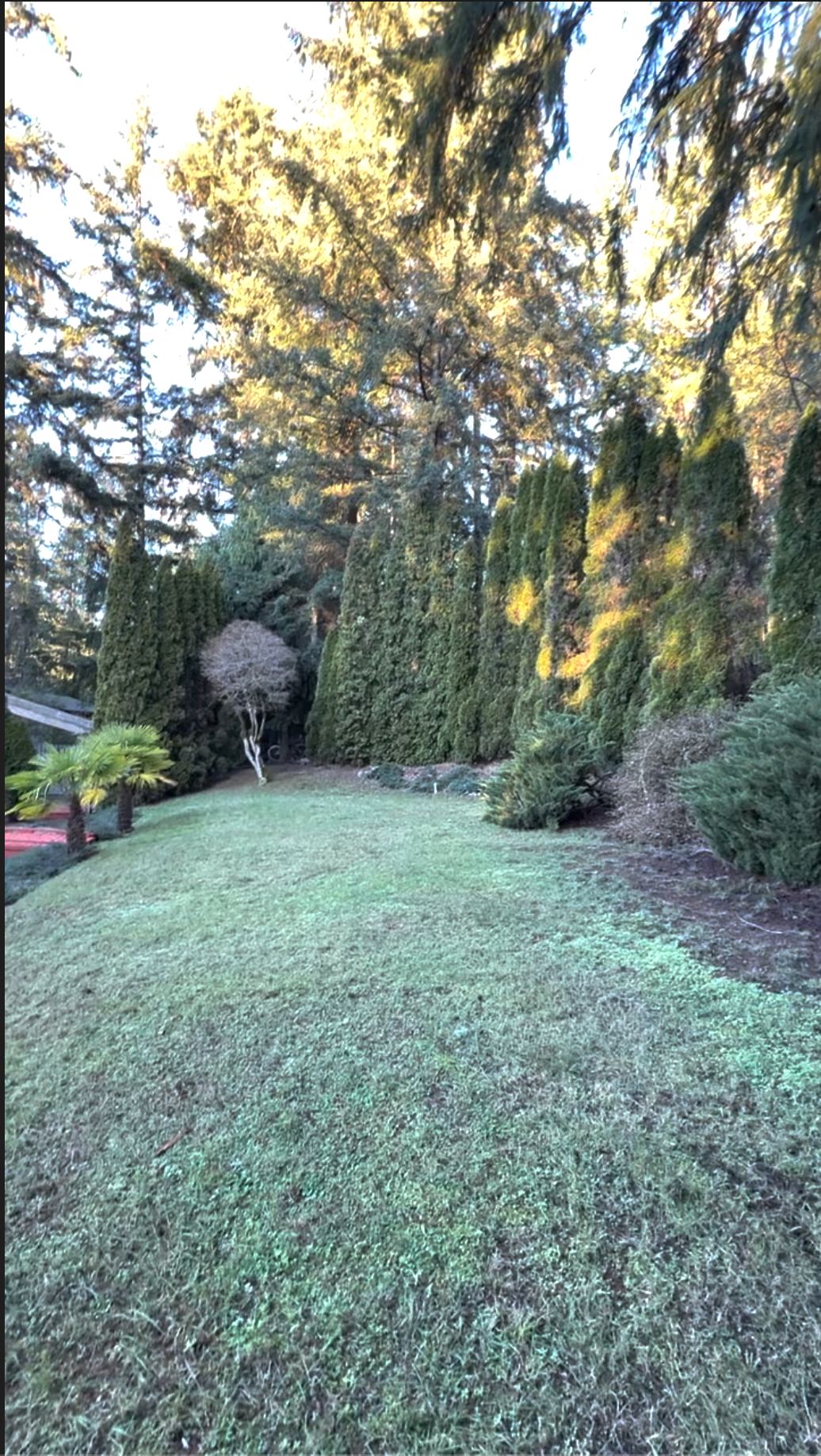
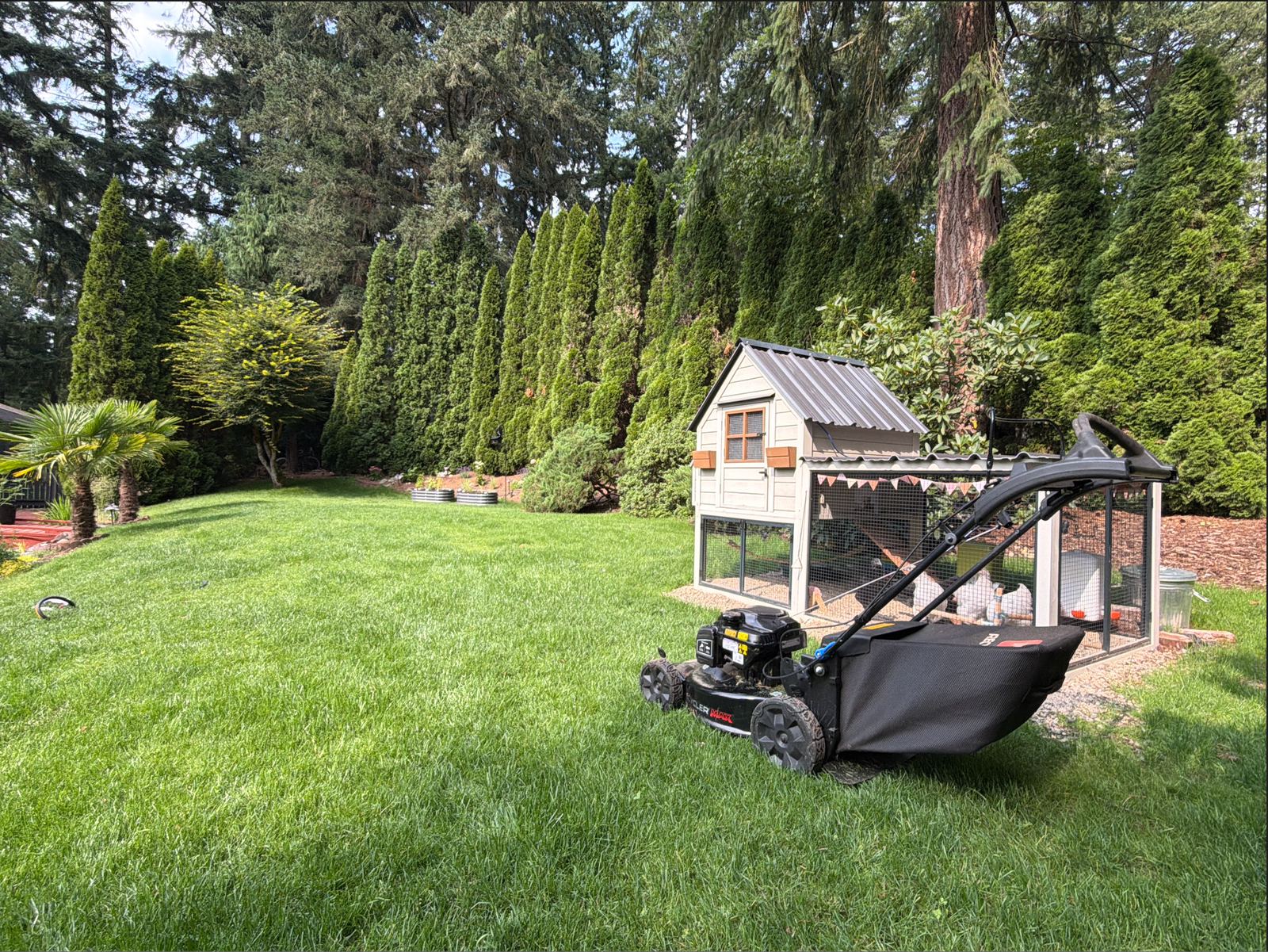
Before and after
Back to the general Home Assistant setup.